MX Player Pro MOD APK – Full, Optimized, Lite
How to install MX Player Pro MOD APK – Full, Optimized, Lite?
1. Tap the downloaded MX Player Pro MOD APK – Full, Optimized, Lite file.
2. Touch install.
3. Follow the steps on the screen.
Description
Table of Contents
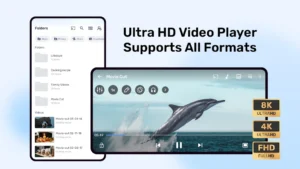
MX Player Pro is an Android video player designed for people who want more control over how videos play on their phones. It supports hardware acceleration, subtitle customization, playback gestures, and different decoding options to help handle a range of video files. The Pro edition is intended mainly for local media playback, rather than the full online entertainment service.
The MX Player Pro MOD APK listing uses the labels “Full,” “Optimized,” and “Lite.” However, these labels alone do not confirm which features have been changed or unlocked in the modified build. Users should distinguish the player’s established functions from claims made about a third-party APK.
What Can You Do With MX Player Pro?
Play videos stored on your device
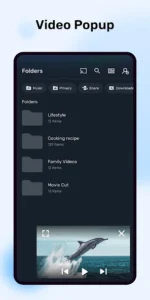
MX Player Pro is useful for watching downloaded movies, personal recordings, educational videos, and other supported media files. Its local-player approach is convenient when you want to browse videos stored on your Android device instead of relying on a streaming service.
Playback compatibility depends on the video format, audio codec, device hardware, and software configuration. A file that plays correctly on one phone may behave differently on another.
Use hardware acceleration
One of MX Player’s key features is hardware-accelerated decoding. It can use compatible device hardware to process video, potentially reducing the processing load compared with software decoding.
The player also offers HW and HW+ decoding options. According to the official support documentation, HW+ uses MX Player’s own media framework, while HW relies on the device’s standard media framework. Neither mode is guaranteed to work with every device or file.
If a video stutters, has audio problems, or displays incorrectly, trying another decoder may help. The result depends on the device and the media being played.
Customize subtitles and playback
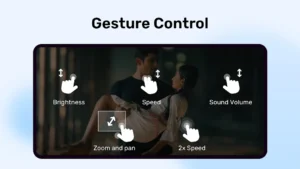
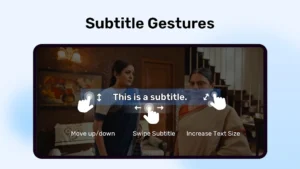
MX Player supports subtitle files and provides controls for adjusting subtitle timing, position, size, and appearance. Gesture-based controls also make it possible to seek through a video or adjust subtitle text without navigating through multiple menus.
These options are particularly useful for foreign-language films, tutorials, and downloaded lectures. For troubleshooting, the official MX Player subtitle help guide explains common subtitle issues and available settings.
Control the viewing experience
Playback gestures, zoom controls, and decoder settings give users more flexibility than a basic video player. Depending on device support, users can adjust how a video fits the screen and choose the playback method that works best for a particular file.
If your main interest is creating or editing videos rather than watching them, you can also explore CapCut Pro APK or Alight Motion MOD APK. These tools serve a different purpose: video editing and visual effects instead of local media playback.
What Do “Full, Optimized, Lite” and MOD of MX Player Pro Mean?
These words are claims attached to this listing, not independently verified descriptions of its internal changes. “Lite” may suggest a smaller or simplified build, while “optimized” suggests performance changes, but neither label proves that the APK uses fewer resources or performs better.
Likewise, the available information does not establish whether this particular MOD removes advertisements, unlocks paid functions, or changes any other feature. Those details should remain unverified until the actual file is examined and tested.
MX Player’s official support page explains that the Pro app is a standalone, lightweight player intended for local video playback without ads. That official product description should not be treated as proof that a third-party modified package has the same behavior.
Is the MX Player Pro MOD APK Worth Installing?
Your decision depends on whether you need a straightforward local video player or specifically want the changes claimed by the modified version. The official app is the more transparent option for users who prefer an established distribution channel, official support, and clearer information about the software.
A modified APK comes from a separate distribution source, so its contents and signing identity may differ from the official release. Before installing one, consider scanning the file with a reputable security tool, checking the requested permissions, and avoiding unnecessary access to personal data. A scan alone cannot guarantee that an app is safe.
You should also be cautious if the installer requests permissions that do not appear necessary for local playback. Keep important files backed up, particularly if you plan to replace an existing installation.
Final Verdict
MX Player Pro is built around practical video playback features, including hardware acceleration, subtitle controls, and flexible decoding options. It can be useful for Android users who regularly watch locally stored media.
However, the “Full, Optimized, Lite” claims for this MOD build have not been independently confirmed. Choose it based on verified compatibility and your own requirements, rather than assuming that every advertised modification is present. For official product information, consult the MX Player listing on Google Play and the official support website.
What's new
Experience a smoother, faster, and more reliable application with our latest update. We've squashed bugs and optimized performance to ensure you have the best possible experience.
Images