Stream India APK
33.8 MB
v1.1.9
Android 7.0+
Description
Direct Download, Features & Technical Guide
Stream India APK is an Android streaming application built around live sports and entertainment content. The v1.1.9 APK supplied for this guide contains dedicated components for live cricket, football, movies, Indian TV, anime and video playback.
Table of Contents
If you are looking for download, this guide covers the actual APK details, key features, installation process, permissions and technical information without adding unsupported claims.
What Is Stream India APK?
It is an Android entertainment and streaming app that brings different types of video content into one application. The supplied APK includes separate components for cricket, football, movies, Indian television and anime.
The app also contains Media3/ExoPlayer-related playback components, indicating that video playback is an important part of the application.
For users interested in other Android entertainment apps, you can also explore Vedu APK on GetAPKMods.
Features
Live Cricket
Cricket is one of the major sections found inside the supplied APK. Dedicated live-cricket components and API references are included in the package.
Live Football
The APK also contains football-related live-streaming components, making the app relevant to users who follow football as well as cricket.
Movies and TV
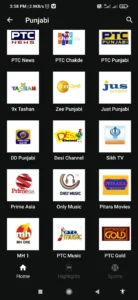
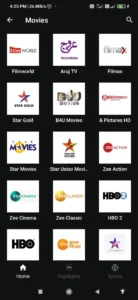
Stream India includes separate functionality for movies and Indian TV content. The application appears to retrieve content through online API endpoints rather than storing a complete media library inside the APK.
Anime Content
Anime-related components and API references are also present, giving the application a broader entertainment focus beyond live sports.
Video Playback
The APK contains Media3/ExoPlayer-related components for handling video playback. Actual playback quality and availability can depend on the particular stream, server and internet connection.
If you want another entertainment-focused Android option, see the PikaShow APK guide on GetAPKMods.
Stream India APK Technical Details
The supplied v1.1.9 APK was inspected for its package structure and technical information.
- App Name: Stream India
- Version: v1.1.9
- Package Name:
com.example.streamindia - APK Size: 35,430,165 bytes (~33.79 MB)
- Main Activity:
com.example.streamindia.MainActivity - Native Libraries: No
lib/directory was found - SHA-256:
3f57261992ad5068bfe4c49907a1a2f1e3b3cab8975563f1710f8c1b61c6610b
The APK declares permissions related to internet/network access, notifications, foreground services and wake locks. These permissions can support streaming and background application functions, but their presence alone does not prove how every permission is used.
How Stream India Works
The supplied APK references endpoints for different sections, including paths associated with:
- Live cricket
- Live football
- Movies
- Anime
- Stream India API services
This means much of the content is expected to be retrieved online after the application launches. The APK itself is therefore not equivalent to a complete offline media library.
A stable internet connection is recommended when using online streaming features.
How to Download Stream India APK
If you are specifically searching for Stream India APK download, use the APK download button provided on the GetAPKMods page and wait until the file has completely downloaded.
Before opening the file, check that the downloaded version matches v1.1.9.
Android treats APKs installed from outside Google Play differently from apps installed through the Play Store. Google explains that apps distributed through websites can be installed manually, but users may need to allow installation from the particular source first.
How to Install Stream India APK on Android
- Download Stream India APK v1.1.9.
- Open your Android Downloads folder.
- Tap the downloaded APK.
- If Android asks for permission, allow your browser or file manager to install apps from that source.
- Return to the APK and tap Install.
- Wait for the installation to finish.
- Open Stream India from your app drawer.
On newer Android versions, installation permission is normally associated with the specific app that is installing the APK rather than one universal unknown-sources switch.
Stream India APK Security Notes
Because this is an APK distributed outside the normal Google Play installation process, users should verify the file before installing it.
The supplied APK has the SHA-256 hash:
3f57261992ad5068bfe4c49907a1a2f1e3b3cab8975563f1710f8c1b61c6610b
You can use this value when comparing the downloaded file with the APK analyzed for this article.
It is also recommended to keep Google Play Protect enabled. Google says Play Protect checks apps installed from sources outside Google Play and can warn about, disable or remove potentially harmful applications.
Google Play Protect security guide
Stream India APK Not Installing?
If Android displays “App Not Installed”, try these checks:
- Make sure the download completed successfully.
- Check available storage.
- Confirm that your Android version is compatible.
- Remove an older conflicting Stream India installation if necessary.
- Download the APK again if the file appears corrupted.
- Keep Google Play Protect enabled and review any warning Android displays.
If Android blocks the installation, check the installation permission for the browser or file manager you used. Google notes that Android restricts installations from unverified sources for security reasons.
Buffering Problems
Streaming performance depends on more than the APK itself. Slow Wi-Fi, mobile-data congestion, overloaded servers or an unavailable stream can all cause buffering.
Try switching between Wi-Fi and mobile data, restarting the stream or selecting a lower playback quality when that option is available.
The presence of streaming APIs inside the APK also means that content availability can change independently of the installed APK.
Stream India APK vs Other Streaming Apps
Stream India focuses on a combination of live sports and entertainment, while other apps may concentrate more heavily on movies, television or a particular sport.
For example, GetAPKMods also covers Vedu APK and other entertainment applications, so users can compare different Android streaming options according to the content they actually need.
For football-focused entertainment, you can also check Pelota Libre TV.
Final Thoughts
It is a multi-section Android streaming application with dedicated functionality for live cricket, football, movies, Indian TV and anime. The supplied APK is approximately 33.79 MB and uses online endpoints to retrieve different categories of content.
Its technical structure confirms that streaming and online content retrieval are central to the application. However, individual streams and content availability can change depending on external servers and sources.
If you want to install Stream India APK, verify the version and APK file before installation, keep Google Play Protect enabled, and use a stable internet connection for streaming.
Images